ColdFusion programmers can harness the power of SEO friendly URLS in their applications by utilizing the URL Rewrite module which is built into IIS 7+ (or .htaccess on Linux boxes.)
First of all, by Search Engine Friendly, I am referring to a URL that looks something like this.
http://www.domain.com/news/123/ford-trucks-for-sale/
Without URL Rewrite, ColdFusion programmers would normally have to physically create those directories on the server in order to process that URL.
Like this...

With a simple URL Rewrite Rule, you can process that URL very easily. The Rewrite Rule processes the URL so that ColdFusion can understand it.
This SEO friendly URL...
http://www.domain.com/news/123/ford-trucks-for-sale/
becomes...
http://www.domain.com/news/index.cfm?id=123&title=ford-trucks-for-sale
… so ColdFusion can understand it.
Pretty awesome right? Here’s how you do it.
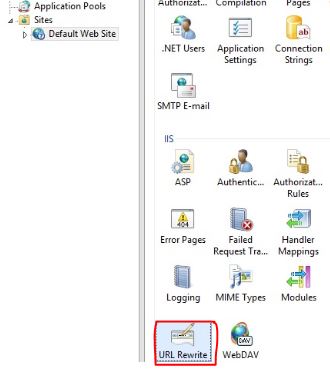
- Create a new URL Rewrite Rule in IIS.
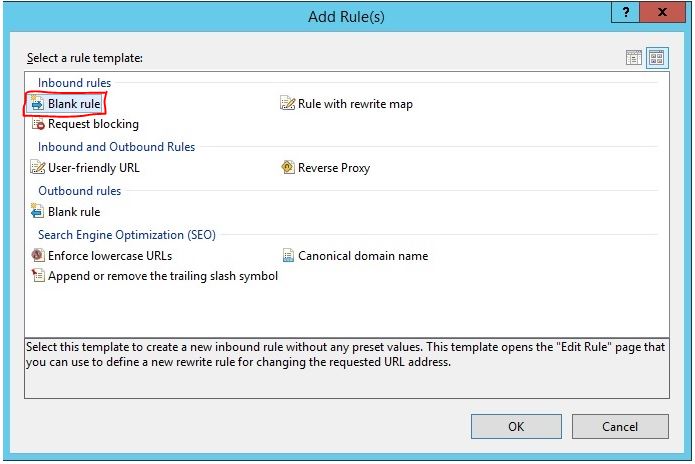
- Create a Blank Rule.
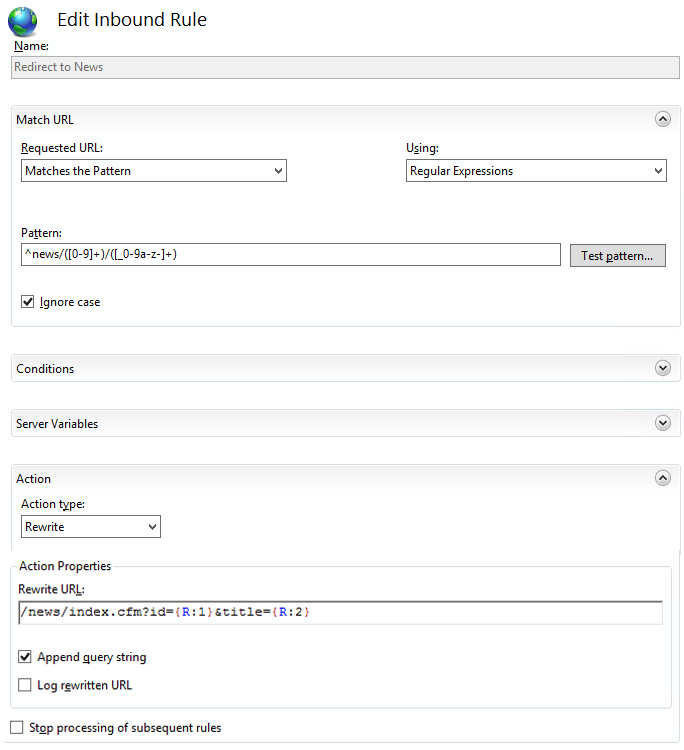
- Your rule should look something like this...
- Pattern: ^news/([0-9]+)/([_0-9a-z-]+)
- Rewrite URL: /news/index.cfm?id={R:1}&title={R:2}
What this actually does is creates a new rule in your web.config file that looks like this...

Let me know if this article was helpful.
Bob Bell
Certified Senior ColdFusion Developer since 1997
http://www.fullblownwebdesign.com